Domain migration is a solved problem, and yet it goes wrong constantly. Not because 301 redirects are complicated, but because most people implement them at the wrong layer, forget the edge cases, or trust their CMS to handle something that belongs at the server or edge.
This is the playbook we use when moving a real production domain with real traffic. Copy the snippets, adapt to your stack, test everything twice.
Why 301 and nothing else
A 301 tells Google (and every other crawler) that a page has permanently moved. Ranking signals, PageRank, and link equity flow through it to the destination. Cached copies eventually update. Bookmarks silently redirect.
Every other option is worse:
- 302 is temporary. Google does eventually treat long-lived 302s as permanent, but “eventually” is measured in months and the equity transfer is slower and less complete.
- Meta refresh tags work in browsers but leak equity because search engines treat them inconsistently. Some pass equity, some do not.
- JavaScript redirects require the crawler to render JS, which it does but not for every URL and not on every crawl. Slow, unreliable, do not use.
- HTTP 307 and 308 exist. 308 is the permanent version of 307 (preserves the request method). For a standard content migration with GET requests, 301 is still the safest choice because every crawler and tool understands it perfectly.
The only reason to use anything other than 301 is if you have API endpoints that must preserve POST bodies. In that case use 308 selectively for those routes.
The layer question: server, edge, or app?
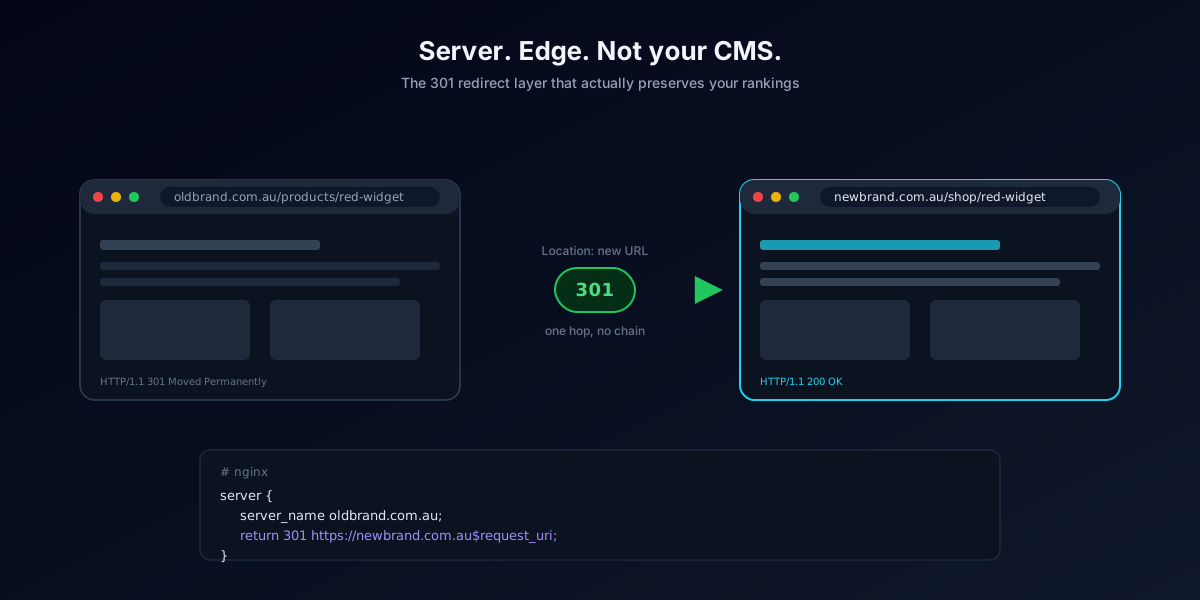
Server level (Apache, Nginx, IIS) is fast, requires no runtime, and survives CMS changes. Best for whole-domain migrations. Every request gets redirected before your application even starts loading.
Edge level (Cloudflare Workers, Cloudflare Bulk Redirects, Fastly, CloudFront) is fastest of all because the redirect happens at the CDN before the request ever reaches your origin. Best if you already sit behind a CDN. Cloudflare’s Bulk Redirects product lets you upload up to 100,000 rules per list.
Application level (WordPress plugins, Rails routes, Django middleware) is fine for one-off page moves but too slow and too fragile for a whole domain migration. Every redirect requires booting your app framework, hitting the database, and returning a response. Do not use this for a migration involving thousands of URLs.
For a .com.au domain migration, our default is server level if you control the server, edge level if you are on Cloudflare or similar. Never CMS-level for the bulk work.
Apache with .htaccess
Put this in the .htaccess file of the source domain’s document root. It redirects the entire domain to the destination while preserving the URI path.
apache
RewriteEngine On
RewriteCond %{HTTP_HOST} ^(www\.)?oldbrand\.com\.au$ [NC]
RewriteRule ^(.*)$ https://newbrand.com.au/$1 [R=301,L]
For URL-by-URL mapping (which is what you actually want, not blanket redirects), use a RedirectMatch block for each unique mapping:
apache
Redirect 301 /old-product-page/ https://newbrand.com.au/products/new-product/
Redirect 301 /about-us/ https://newbrand.com.au/company/
Redirect 301 /blog/2023/old-post-slug/ https://newbrand.com.au/blog/new-post-slug/
For large migrations, generate the .htaccess programmatically from your URL mapping spreadsheet. A thousand-line .htaccess is fine. A ten-thousand-line one starts to slow Apache down and you should move the rules to Nginx or an edge platform.
Nginx server block
Faster than Apache for this job. Put this in the server block that answers for the old domain.
nginx
server {
    listen 80;
    listen 443 ssl;
    server_name oldbrand.com.au www.oldbrand.com.au;

    ssl_certificate /etc/letsencrypt/live/oldbrand.com.au/fullchain.pem;
    ssl_certificate_key /etc/letsencrypt/live/oldbrand.com.au/privkey.pem;

    return 301 https://newbrand.com.au$request_uri;
}
For URL-level mapping, use a map block outside the server context:
nginx
map $request_uri $redirect_target {
    default                     "";
    /old-product-page/          /products/new-product/;
    /about-us/                  /company/;
    /blog/2023/old-post-slug/   /blog/new-post-slug/;
}

server {
    listen 443 ssl;
    server_name oldbrand.com.au www.oldbrand.com.au;

    if ($redirect_target != "") {
        return 301 https://newbrand.com.au$redirect_target;
    }

    return 301 https://newbrand.com.au$request_uri;
}
The default clause at the top of the map catches anything not explicitly mapped and falls through to a same-path redirect. Better than a 404 for URLs you forgot to map.
Cloudflare Workers
If both domains sit behind Cloudflare, a Worker gives you the fastest possible redirect (edge-level, no origin hit) and lets you code arbitrary logic.
javascript
export default {
  async fetch(request) {
    const url = new URL(request.url);
    const mapping = {
      '/old-product-page/': '/products/new-product/',
      '/about-us/': '/company/',
      '/blog/2023/old-post-slug/': '/blog/new-post-slug/',
    };

    const target = mapping[url.pathname] ?? url.pathname;
    const newUrl = `https://newbrand.com.au${target}${url.search}`;

    return Response.redirect(newUrl, 301);
  }
}
Bind the Worker to a route pattern of oldbrand.com.au/* in your Cloudflare dashboard. Done. For very large mappings, use Cloudflare Bulk Redirects instead of a Worker: upload a CSV, set the status code to 301, activate the list.
The seven mistakes that cost people their rankings
1. Blanket redirecting everything to the homepage. Google treats this as a soft 404. Every internal page loses its ranking. Always map URL to URL, even if the destination is a category page.
2. Redirect chains. Old URL redirects to intermediate URL redirects to final URL. Each hop leaks equity and every hop after the first is a fraction of a second slower. Redirect directly to the final destination in one hop.
3. Redirecting HTTP to HTTPS on the old domain and then to the new domain. That is two hops. Redirect directly: old HTTP straight to new HTTPS.
apache
# WRONG (two hops)
http://oldbrand.com.au/page → https://oldbrand.com.au/page → https://newbrand.com.au/page

# RIGHT (one hop)
http://oldbrand.com.au/page → https://newbrand.com.au/page
4. Losing query strings. If your original URLs used query parameters for filtering, pagination, or tracking, make sure your redirect preserves them. In Apache use $1 with the QSA flag. In Nginx use $request_uri or $args. In a Worker use url.search.
5. Forgetting subdomains. blog.oldbrand.com.au, shop.oldbrand.com.au, and cdn.oldbrand.com.au all need their own redirect rules. Each subdomain is a separate host in DNS and a separate SSL certificate. Do a DNS audit of the old domain before you migrate.
6. Forgetting www vs non-www. Register both variants in Search Console. Redirect both to the same canonical destination.
7. Killing redirects too soon. Google says 301s need to be live for at least a year. In practice, keep them live indefinitely. The cost is zero, the cost of taking them down is significant. Budget for the source domain’s renewal every year, forever.
Testing before you flip DNS
Use curl to verify every redirect returns 301 with the correct Location header:
bash
curl -I -L https://oldbrand.com.au/old-product-page/You want to see a single 301 response followed by a 200 at the destination. Any chain of two or more redirects means fix your rules.
Run a full crawl of the source domain (Screaming Frog, Sitebulb) once redirects are live and export the response codes. Every URL should be 301 or 410 (for pages you are intentionally removing). Any 404s or 500s are mistakes to fix immediately.
For the destination domain, crawl and check for pages returning 404 that were expected to exist. Common cause: your URL mapping spreadsheet pointed to a slug that got changed during the site build.
Post-migration checklist
- All source URLs return 301 to the correct destination in one hop
- Query strings preserved where relevant
- All subdomains handled with their own rules
- www and non-www both redirect consistently
- HTTPS certificate on the old domain is valid (redirects still need SSL)
- Change of Address submitted in Search Console
- Fresh XML sitemap submitted for the destination domain
- Old sitemap resubmitted so Google can crawl the redirects
- Internal links on the destination domain updated to point directly (no redirects)
- Off-site citations updated: GMB, directories, social profiles, email signatures
- Old domain renewal set up on auto-renew, ideally paid for 5 to 10 years in advance
- Monitoring in place for 404 spikes and crawl errors
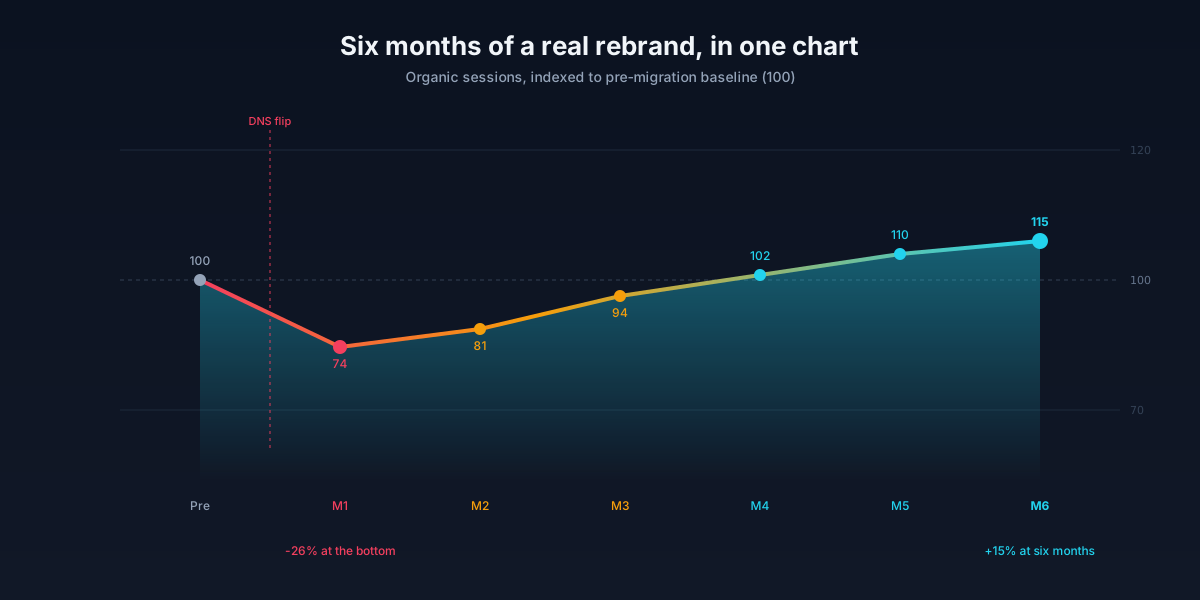
Get all twelve of these right and you will keep 90 to 95 percent of your organic traffic through the migration. Miss two or three and you will spend the next six months trying to figure out why traffic never came back.
The redirect layer is not the exciting part of a rebrand. It is the part that determines whether the exciting part was worth doing.