A WHMCS website builder integration lives or dies on the provisioning module. Everything else is downstream. The pricing page can be beautiful, the AI generation can be excellent, the branding can be perfect, but if the provisioning module misfires on 3 percent of orders, the hosting provider ends up with a support queue that eats the margin and a customer base that resents both vendors.
We have shipped, reshipped, and iterated on WHMCS provisioning for our own platform, and we have watched partners integrate it into their environments hundreds of times. Six patterns account for almost every well-behaved WHMCS website builder integration we have seen. This piece walks through each one with enough technical detail to be actionable rather than aspirational.
Table of Contents
Why WHMCS is the anchor billing platform for hosting-attached AI builders
WHMCS is the dominant billing and automation platform for hosting providers globally. There are competitors (Upmind, Blesta, HostBill), but WHMCS’s install base is large enough that any WHMCS website builder integration that works well opens up the majority of the addressable reseller market immediately. Getting the module right is the leverage point.
The other reason WHMCS matters is that its provisioning module contract is well-defined. A properly written module can handle orders, upgrades, cancellations, refunds, and suspensions through a stable interface. Getting it right once means the resulting integration works across thousands of individual hosting deployments with minimal per-partner configuration. That is a rare property in the reseller ecosystem, and it is why WHMCS website builder integrations are usually the first module a serious vendor writes.
What a WHMCS website builder module has to handle
Before the patterns, a checklist of what the module actually has to do. Every one of these needs a defined behavior, and edge cases in any of them create tickets at scale.
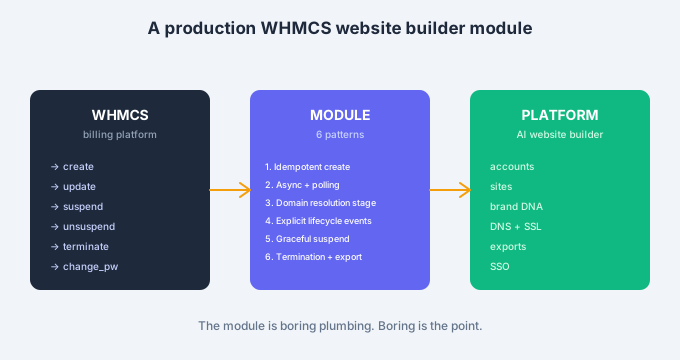
- Create account. New order placed and accepted; provision the customer’s site.
- Update account. Package or plan changes; adjust entitlements.
- Suspend account. Non-payment or hold; disable site access but preserve data.
- Unsuspend account. Payment cleared; restore access.
- Terminate account. Cancellation confirmed; export data and delete.
- Change password. Customer or admin action; propagate to platform.
- Login link. Admin-initiated single sign-on from WHMCS into the platform.
That is the standard WHMCS module surface. A WHMCS website builder module that handles all seven cleanly is production-ready. A module that handles only three or four is a demo, not an integration.

The 6 proven WHMCS website builder provisioning patterns
Each of these solves a specific class of problem that recurs across hosting-provider deployments. Skipping any one produces predictable failures within the first ninety days of production.
1. Idempotent create on order accepted
The single most important pattern. When WHMCS fires the create event, the module might be called once. It might also be called twice because a webhook retried. It might be called three times because a customer refreshed a page. The module has to handle repeat calls without creating duplicate accounts, sending duplicate welcome emails, or double-provisioning storage.
Idempotency is achieved by keying every create call to the WHMCS service ID and checking whether that service ID already has an account on the platform before doing anything. If it does, return success and log the duplicate. If it does not, proceed with creation. This pattern eliminates one entire class of production ticket that partners otherwise deal with weekly. Any WHMCS website builder module without idempotent create is not production-grade.
2. Async provisioning with polling
Site creation involves multiple downstream steps: account setup, storage allocation, initial AI generation, DNS configuration, SSL provisioning. Synchronous execution of all these steps inside the WHMCS module call is a bad idea. WHMCS has a timeout. The AI generation step alone can take longer than that timeout in some conditions.
The right pattern is asynchronous. The module fires a create request to the platform, receives an acknowledgment with a job ID, and returns success to WHMCS immediately. The platform then executes the actual provisioning in the background, and the module or the customer’s dashboard polls for status. This decouples WHMCS’s request-response cycle from the platform’s actual work, which is what production WHMCS website builder integrations need to handle real load.
3. Domain resolution as a separate stage
A hosting-attached WHMCS website builder often provisions before the customer’s domain is fully registered and resolvable. If the module assumes the domain is ready at creation time, it will fail for a percentage of orders where DNS has not propagated or the registration is still processing.
The right pattern is to treat domain resolution as a separate provisioning stage that runs asynchronously and retries with backoff. The site is created and accessible at a temporary URL immediately. The domain switches over when it becomes resolvable, which may be seconds later or hours later depending on the registry. Customers see the site at the temporary URL right away and at their final domain when DNS catches up. This pattern eliminates DNS-related tickets, which are otherwise a persistent source of frustration.
4. Explicit lifecycle events for upgrades and downgrades
Package changes in WHMCS should trigger explicit lifecycle events on the platform side, not silent state changes. If a customer upgrades from a $10/month plan to a $25/month plan, the module needs to update the entitlements, unlock the new features, and log the change so both sides have consistent state.
The failure mode without this pattern is drift. WHMCS thinks the customer is on Plan B and the platform still shows Plan A. Support calls follow. The correct pattern is explicit event handling on the module side and idempotent state synchronization on the platform side. Every plan change generates a discrete event with a clean before-and-after state.
5. Graceful suspension and reactivation
When a customer’s payment fails, WHMCS suspends the service. When it clears, WHMCS unsuspends. The WHMCS website builder module needs to translate these suspension events into a graceful experience on the platform side, which for a hosted site typically means: keep the site data intact, disable the public URL with a friendly notice, disable the editor, and preserve billing state.
The reactivation should be a single API call that flips everything back. If the customer had made edits before suspension, those edits are still there. If they had media uploaded, the media is still there. Data preservation during suspension is what turns a bad customer moment into a saveable one. Modules that delete data on suspension because “the customer will probably terminate anyway” create irrecoverable churn.
6. Termination with data export
Terminations happen. The module has to handle them without leaving the customer feeling that they lost work. The pattern is a two-stage termination: WHMCS fires terminate, the module marks the account for termination but does not immediately delete, and the customer receives a link to export their site content, brand assets, and any generated files.
The export window can be short (7 to 14 days is typical) but it has to exist. Customers who feel like they walked away with their work talk positively about the experience. Customers who feel like their data was destroyed at the moment of cancellation do not. The margin cost of the export is trivial. The reputation cost of missing it is not.

Common failure modes at scale
Four failure modes we have watched partners hit repeatedly once volume ramps.
- Non-idempotent create. Duplicate orders create duplicate accounts, and reconciliation is a nightmare after a few hundred cases.
- Synchronous provisioning that times out. Random 1 to 3 percent of orders fail with a timeout, and the customer thinks the whole product is broken.
- Aggressive domain resolution assumptions. Any customer whose DNS is slow gets a broken first experience.
- Silent plan changes without lifecycle events. WHMCS and the platform drift out of sync, and support calls compound.
Every one of these is preventable with the six patterns above. The reason they recur is that early WHMCS website builder modules are usually written to pass a demo, not to run at hundreds of thousands of orders. The patterns above are what turn a demo module into a production one.
How to test a WHMCS website builder module before production
Four tests we recommend running on any WHMCS website builder module before opening it up to real customer traffic.
- Fire create twice with the same service ID. Confirm exactly one account exists at the end.
- Simulate a slow platform. Delay the create response by 30 seconds. Confirm the module handles it without timing out or double-firing.
- Order with an unregistered domain. Confirm the site provisions at a temporary URL and switches to the final domain when DNS is set.
- Terminate, then check data export. Confirm the customer receives an export link and the data is retrievable for the promised window.
Any WHMCS website builder module that passes all four is ready for production. Ones that fail any of them will produce ticket volume that eats the reseller’s margin, which is the outcome the module was built to avoid in the first place.
For a walkthrough of the actual WHMCS integration we ship for BrandForge and how it implements these patterns, see the linked page. For the broader integrations landscape, the platform integrations overview covers Upmind, Blesta, HostBill, and the other billing platforms hosting providers use. For a related read on how the technical integration shapes the reseller economics, our reseller billing models page has more context.
Externally, the WHMCS official developer documentation on provisioning modules is the canonical reference and worth reading before writing any custom code.
What operations teams learn in the first ninety days after go-live
Operations teams running a WHMCS website builder module in production for the first time surface the same handful of unexpected situations, and knowing them in advance saves the team from treating each one as a novel emergency.
The most common surprise is the customer who cancels the domain but wants to keep the site. The billing platform terminates the WHMCS website builder service when the linked domain is cancelled, and the customer discovers they have lost their site content. The right pattern is to decouple the site subscription from the domain subscription so cancelling one does not automatically cancel the other. Most partners learn this by handling a few painful cases before adjusting the module logic.
The second surprise is the DNS-related ticket volume in specific geographies. Some registries have slower propagation than others, and the customer sees a broken first experience for hours rather than minutes. The right pattern is to instrument the module to detect slow propagation and communicate proactively rather than waiting for the customer to open a ticket.
The third surprise is the refund case. WHMCS handles refunds cleanly on the billing side, but the WHMCS website builder module has to decide what happens to the customer’s site content when a refund is issued shortly after a purchase. Deleting immediately feels punitive. Keeping it forever feels like the platform is holding data hostage. The pattern that works is a short grace period with clear communication, during which the customer can either export their content or reactivate the service.
Each of these situations feels small in isolation and adds up to real support cost across a base of thousands of customers. Getting them right in the initial module design is much cheaper than learning them one at a time in production.
How the WHMCS website builder integration evolves over the first year
By year one, the module has usually gone through three or four iterations, each triggered by a specific class of production incident. The evolution follows a predictable path.
The first iteration usually happens in month two, when the initial idempotency assumptions turn out to be incomplete. Some edge case in the checkout flow was not accounted for, and a small number of duplicate accounts appear. The fix is a tighter idempotency key check.
The second iteration usually happens in month four, when the DNS resolution stage reveals that some registries take longer to propagate than expected. The fix is more generous backoff and better customer communication during the wait.
The third iteration usually happens in month seven, when the volume of upgrade and downgrade events becomes large enough that manual reconciliation of drift cases is no longer practical. The fix is a scheduled reconciliation job that runs nightly and flags any drift between WHMCS and the platform for automated correction.
The fourth iteration usually happens around the twelve-month mark, when the accumulated learning from a full year of production suggests a broader restructuring. The module gets refactored based on what a year of real operation revealed, and the resulting version usually holds for two to three years without significant change.
Common questions from developers writing a WHMCS website builder module
Two questions come up in almost every technical conversation about building or maintaining a WHMCS website builder integration, and they are worth answering directly.
The first is whether the WHMCS website builder module should be written in PHP or a different language. The honest answer is PHP, because that is what WHMCS itself uses and what the module contract expects. Attempting to write the module in another language requires wrapping every hook in a PHP shim, which adds complexity without benefit. A WHMCS website builder module should be a clean PHP implementation that calls out to a platform API for the actual work.
The second is whether WHMCS’s built-in queueing is sufficient for the async patterns discussed above. The answer is that WHMCS’s queue works for basic cases and struggles at high volume. Serious WHMCS website builder deployments usually offload async work to a separate job system rather than relying on WHMCS’s queue, and the module’s role is to submit jobs and query status rather than to execute the work directly.
Where to go next
A WHMCS website builder integration is not glamorous engineering, but it is the difference between a partner deployment that scales cleanly and one that eats support cost until it stops being economic. The six patterns above are what a decade of WHMCS integrations have taught the industry, and they are what any serious vendor implements before shipping.
We built the BrandForge WHMCS module with all six patterns as the design center, precisely because our partners’ operational cost depends on it working.
- To see the WHMCS module in action or ask specific integration questions, book time via the demo request page.
- For the technical integration reference, start with the WHMCS integration page.
- For hosting-specific economics and rollout, the hosting partner page has the operational view.
A WHMCS website builder module that implements the six patterns cleanly is boring in production. That is exactly what you want.