
- Home
- Integrations
- WHMCS
AI website builder and brand builder for WHMCS
Sell a white-label website builder, logo maker, brand builder and social media tool as native WHMCS products. Automated provisioning, real-time lifecycle sync, your brand end to end.
- Website builder
- Logo maker
- Brand builder
- Social media tool
- ~10 min
- Setup time
- Real-time
- Provisioning
- 6 events
- Full lifecycle
- 84
- Languages

WHMCS + BrandForge Connected through a native module
- Website builder
- Logo maker
- Brand strategy
- Name and domain
- Social media
- Your brand on all of it
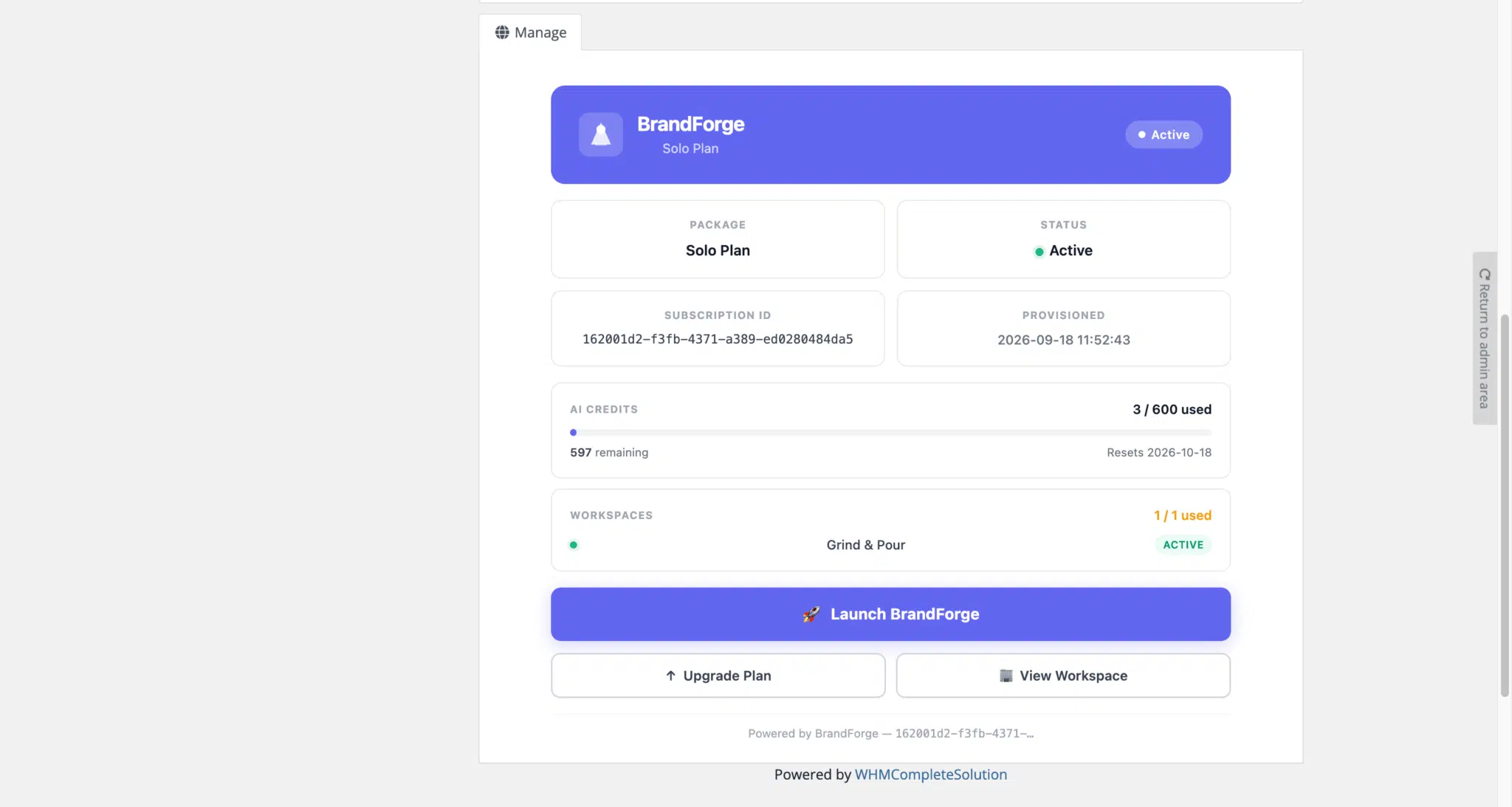
What your customer sees: BrandForge inside your WHMCS client area, under your company name.
Everything your WHMCS customers need to launch a brand
BrandForge adds an AI website builder, logo maker, brand builder and social media tool to WHMCS. Your customers use it under your brand, and you bill it through WHMCS like any other product.
WHMCS website builder
A complete, on-brand website generated from the customer's brand strategy and logo. Inline editing, ready to publish on the customer's own domain. A white-label site builder that carries your brand, not ours.
Explore the website builderWHMCS logo maker
Vector logo concepts in the customer's brand style, previewed on signage, packaging and screens before they commit. Ready to export or drop straight onto their new site.
Explore the logo makerWHMCS brand builder
Positioning, audience and personality, generated as an editable brand strategy. Every choice comes with the reasoning behind it, so the result is something a business can actually use.
Explore Brand DNABusiness name and domain finder
Name ideas checked against domain availability, so a new business can go from idea to registered domain in one flow.
Explore namingWHMCS social media tool
A social media co-pilot that turns the brand into on-brand posts, so customers keep using the product long after their site is live.
Explore the social co-pilotMost WHMCS hosting providers already sell domains, hosting and email. BrandForge adds the part customers usually buy somewhere else: a website builder, a logo maker, a brand builder and a social media tool. It installs as a standard WHMCS provisioning module, so the sitebuilder becomes a product in your own catalog, on your own invoices, with your own pricing.
See it inside WHMCS
Real screenshots of the WHMCS module. Click a screenshot to open it full size.


A native WHMCS product, not a bolt-on
BrandForge behaves like any other product in your WHMCS catalog. The module handles provisioning, the customer never leaves your brand, and every subscription state syncs both ways in real time.
Automated provisioning
Order placed in WHMCS, account created in BrandForge instantly. No manual intervention, no shared spreadsheets.
White-label experience
Customers see your domain, logo, colours and SSL. Emails, notifications and PDFs all run under your brand.
Package and plan sync
Sync BrandForge packages into WHMCS and map each tier to a product. You set the retail price. Wholesale is billed to you monthly.
Single sign-on
One click from the WHMCS client area straight into BrandForge. No second password, no support tickets.
From order to brand in 4 steps
-
Customer orders in your storefront
A BrandForge plan is added to cart in WHMCS like any other product. Payment is captured on your merchant account.
-
WHMCS provisions the account
The module calls the BrandForge API, creates the account under your reseller ID, and passes back credentials.
-
The customer builds their brand
They land in your white-label BrandForge and generate a brand strategy, logo, website and social content.
-
Lifecycle syncs both ways
Upgrades, downgrades, suspensions and cancellations flow between WHMCS and BrandForge in real time.
Live in about 10 minutes
Five steps from download to first sale. Your dev team is not required.
- Get the moduleDownload it from the WHMCS Marketplace, GitHub or your BrandForge partner portal.
- Upload to WHMCSExtract to /modules/servers/brandforge/ on your WHMCS install. Standard WHMCS module location.
- Add BrandForge as a serverIn System Settings, Servers, add a new BrandForge server with your API key and reseller ID.
- Create your plansSync the BrandForge packages and map each one to a WHMCS product. You set the retail price.
- Enable and go liveTurn the products on in your cart. New orders provision instantly. Existing customers can be imported by CSV.
Under the hood
The technical details your team will ask about.
- Integration type
- WHMCS provisioning module (PHP)
- Authentication
- BrandForge API key plus reseller ID
- Provisioning events
- create, suspend, unsuspend, terminate, upgrade, downgrade
- Webhook events
- subscription.updated, invoice.paid
- Where to get it
- WHMCS Marketplace, GitHub and the BrandForge partner portal
- Data direction
- Bi-directional. WHMCS is the source of truth for subscription state.
Built for WHMCS resellers
Hosting providers and registrars who already run WHMCS as their billing spine and want a recurring website builder and branding line on every domain, hosting and email sale. No stack change, no roadmap detour, no new billing system to learn.
Requirements
- WHMCS 8.6 or later
- PHP 8.1 or later
- BrandForge partner plan (any tier)
- Outbound HTTPS to api.brandforge.com
WHMCS integration FAQ
How does billing work?
You bill your customers through WHMCS exactly as you already do. BrandForge invoices you monthly at wholesale for active subscriptions. You keep the difference, which is typically around 50 percent of retail.
Is the customer experience fully white-labelled?
Yes. Customers see your domain, logo, colours, fonts and SSL end to end. Emails, notifications, PDF exports and the BrandForge app itself all run under your brand. The BrandForge name never appears.
What happens on upgrades, downgrades and cancellations?
The module syncs create, suspend, unsuspend, terminate, upgrade and downgrade events in real time. WHMCS is the source of truth for subscription state.
Can I migrate existing customers?
Yes. The partner portal supports CSV import to bulk-provision existing WHMCS customers into BrandForge without them having to reorder.
Who handles customer support?
You handle L1 support with your customers, which keeps the relationship yours. BrandForge handles L2 and L3 platform issues through your named partner manager.
Does it work with WHMCS reseller and multi-brand setups?
Yes. Single-seat, reseller and multi-brand WHMCS installations are all supported. Each brand can be mapped to its own BrandForge white-label configuration.
Is there a website builder for WHMCS?
Yes. BrandForge is an AI website builder, or sitebuilder, that runs inside WHMCS through a native module. Your customers generate and publish a complete website, plus a logo, brand strategy and social media content, all under your brand.
Can my WHMCS customers create a logo and brand identity?
Yes. The logo maker produces vector logo concepts from the customer's brand strategy, and the brand builder covers positioning, audience and personality. Everything is generated inside your white-label BrandForge instance.
Does BrandForge include a social media tool for WHMCS customers?
Yes. The social media co-pilot creates on-brand social content from the same brand strategy, so your WHMCS customers keep using the product after their website is live.








Add a website builder to every WHMCS product you sell
Install the module, enter your API key and start selling. Live in about 10 minutes.
- Live integration
- Full white-label
- WHMCS 8.6+
- Free for partners
