

Every hosting provider that has launched a branded AI website builder in the last twelve months has hit roughly the same set of problems in roughly the same order. This is unusual. Most product launches fail in unique ways. The branded AI website builder launch fails in predictable ones, which means the playbook is knowable.
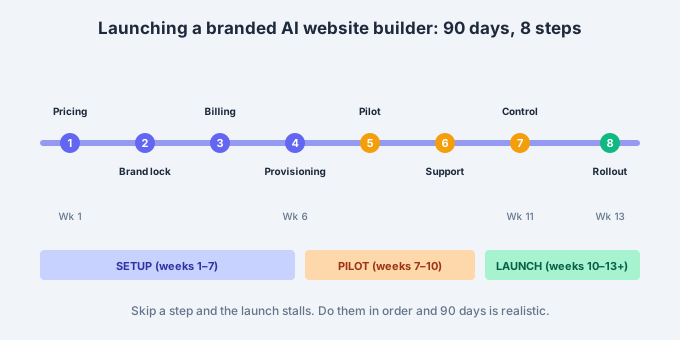
We have now walked ten partners through the same rollout and the pattern is clear. Eight steps, in sequence, with a natural cadence of about ninety days from decision to first paying customer. Skip a step and the launch stalls. Do them in the wrong order and the sales team ends up selling a product the ops team cannot support. This piece is the actual sequence, with what usually goes wrong at each stage.
Table of Contents
Why a branded AI website builder launch is different
A traditional hosting product launch is largely a marketing exercise. The product already exists, the plumbing already works, and the launch is about pricing, positioning, and campaign timing. A branded AI website builder launch is a systems integration exercise first and a marketing exercise second. Half the launch risk is on the technical side, and hosting teams that treat it like a marketing rollout consistently stall around week six.
The other thing that makes a branded AI website builder launch different is the customer expectation. When a hosting customer buys SSL from the hosting provider, they expect a certificate to appear and forward it to their developer. When they buy an AI website builder, they expect to end up with a working site the same day. That expectation gap has to be managed with product design, not customer service. Any launch plan that leans on support to close the gap will collapse under the ticket volume.
What the launch actually involves
A branded AI website builder launch involves five distinct workstreams, all running in parallel with dependencies between them.
- Commercial. Wholesale price, retail price, packaging, promo mechanics, competitive positioning.
- Brand. Reseller identity applied to every surface: editor, dashboard, transactional emails, error pages, domain the tool runs on.
- Technical integration. Provisioning module in the billing platform, DNS and SSL automation, customer authentication, single sign-on if applicable.
- Operations. Support training, escalation path, refund policy, migration procedure for existing customers.
- Go-to-market. Landing page, campaign timing, sales enablement, existing-customer communication.
The eight steps below sequence these five workstreams in the order that consistently produces a working launch. The sequence is not arbitrary. Each step unblocks the next, and doing them out of order usually means reworking one or more later.

The 8 proven launch steps for a branded AI website builder
1. Decide the wholesale-retail spread first
Everything downstream depends on the pricing decision. Retail price sets the target customer segment. Wholesale price determines the margin available for marketing and support. The spread between the two determines whether the launch can afford paid acquisition, discounted trials, or promotional bundles.
Get this wrong at the start and every subsequent decision compounds the error. We recommend spending the first two weeks on the pricing model alone. Talk to three existing customers about willingness to pay. Look at the closest competitors’ retail prices. Model the required volume at your projected margin. Only then commit to a retail price and hold the wholesale rate to a level that keeps the spread workable.
2. Lock the brand identity of the reseller instance
A branded AI website builder is only branded if the branding is complete. That means the logo, colors, typography, and voice appear consistently across the editor, dashboard, transactional emails, error pages, help documentation, and the domain the tool runs on. Half-branded launches leak vendor signals through email footers or fallback error pages, and customers notice.
The right sequencing is to lock the brand identity before any integration work begins. The brand kit becomes the fixed reference for engineering, so nothing gets built on placeholder branding that has to be replaced later. For most partners this takes ten to fifteen business days including internal sign-off, less if the marketing team is decisive.
3. Configure the billing platform integration
The billing platform integration is where the branded AI website builder connects to the reseller’s existing customer records, payment methods, and provisioning triggers. For hosting providers this almost always means WHMCS, Upmind, or Blesta. The integration needs to handle new orders, cancellations, upgrades, downgrades, refunds, and the edge cases around each.
This step is often underestimated. The happy path is straightforward. The failure paths are what make the difference. What happens if the credit card fails during a first billing cycle? What happens if the domain the site is meant to be published on is not yet resolvable? What happens if the customer cancels the domain but keeps the site? Answering these questions in configuration before launch prevents most support tickets in the first six weeks.
4. Build the domain-to-site provisioning flow
This is the most technically demanding of the eight steps. When a customer buys a domain and a branded AI website builder subscription in the same checkout, the plumbing has to fire in the right order. The domain has to register, DNS has to point at the platform, SSL has to provision, the site has to generate, and the customer has to land in a working editor within a small window.
The consistent target is under ten minutes end-to-end. That number is not a marketing claim, it is a customer-behavior threshold. Longer than ten minutes and a meaningful fraction of customers assume something is broken and open a support ticket. Under ten minutes and the customer stays engaged. Every partner we have worked with has spent a week or two optimizing this flow after launch, so building slack into the schedule for post-launch iteration is realistic.

5. Migrate a pilot cohort
Every hosting provider considering a branded AI website builder already has an existing website builder somewhere in the stack. Usually the free tier of a legacy tool bundled with cPanel or Plesk, or a rebranded builder from a previous generation. A subset of active customers need to be migrated before launch to prove the migration path works.
Pick fifty to a hundred customers with active sites on the old builder. Migrate them to the new branded AI website builder with a hands-on white glove process. Time each migration. Note where automation fails. Document the manual steps required. This cohort becomes the reference for scoping the wider migration and for training the support team. Skipping this step and going straight to full-base migration is the single most common cause of a botched launch.
6. Train support and set the escalation path
Support training happens after the pilot migration, not before. The pilot surfaces the actual questions customers will ask, which usually differ from what internal teams predicted. The support playbook should be built from the pilot’s real ticket log rather than from imagined scenarios.
The escalation path also matters. Customers on a branded AI website builder are typically small business owners, not developers, so the first-line support tone has to be closer to concierge than to technical help desk. A clear escalation route to the vendor for platform-level issues is essential, and the SLA on that route has to match the customer expectation. Both sides need to agree on the escalation contract before launch, in writing.
7. Launch to a control group
Full-base launches almost always break something no one predicted. A control-group launch, meaning making the product available to a small, defined subset of the customer base for two to four weeks before opening it to everyone, catches the surprises at a manageable scale.
The control group can be a specific plan tier, a specific geography, or a random 5 percent slice. What matters is that it is large enough to generate real signal on conversion, support load, and refund rate, but small enough that any operational issue is contained. Most partners run the control group for three weeks, iterate based on what they see, and only then open the branded AI website builder to the full base.
8. Roll out to the full base
The full rollout is the reward for the previous seven steps. If steps 1 through 7 went well, step 8 is essentially opening the taps and watching the metrics. If they did not, step 8 exposes every unresolved problem simultaneously at scale, which is a much worse learning environment.
For most partners, the full rollout involves a coordinated communication to the existing customer base, a landing page refresh, and a marketing campaign timed to the launch. The technical parts should be routine by this point. If they are not, delay step 8 rather than launching with known issues.
Timeline and typical stall points
The realistic timeline for the eight steps runs about ninety days. Faster is possible but not common. Slower is usually a sign that one of the workstreams has stalled.
- Weeks 1–2: Step 1 (pricing decision).
- Weeks 2–4: Step 2 (brand identity lock).
- Weeks 3–7: Step 3 (billing integration).
- Weeks 4–8: Step 4 (provisioning flow).
- Weeks 7–9: Step 5 (pilot migration).
- Weeks 9–10: Step 6 (support training).
- Weeks 10–12: Step 7 (control group).
- Week 13+: Step 8 (full rollout).
The steps overlap. Step 2 can start while step 1 is still being finalized. Step 4 depends on step 3 being 80 percent done. Step 6 depends entirely on step 5 producing real ticket data. The dependencies are the reason the sequence matters, and the reason parallel work at each stage is possible.
Three stall points are common. First, pricing indecision that drags on past week three, usually because internal stakeholders cannot agree on the target margin. Second, brand identity that is not fully signed off before engineering starts, forcing rework in week six or seven. Third, an over-ambitious pilot migration cohort that includes edge cases before the process is mature, which creates negative early signal and undermines internal confidence.
What to measure at each stage
The most useful launch dashboard has four numbers, tracked from step 5 onward.
- Time-to-live. How long from checkout to a working site at the customer’s domain.
- First-week completion rate. What fraction of new signups publish a site within seven days.
- Support ticket rate. Tickets opened per hundred new signups per week.
- Thirty-day churn. Percentage of new customers who cancel within thirty days.
Targets vary by segment, but rough benchmarks are: time-to-live under ten minutes, first-week completion above 55 percent, ticket rate below fifteen per hundred signups, and thirty-day churn below 8 percent. Miss any of these by a wide margin and the launch is not ready to expand.
For a deeper walkthrough of the technical integration side specifically, the WHMCS integration page covers the provisioning hooks, and the platform integrations overview covers the other billing platforms we support. For the strategic side, our hosting partner page has the economics view.
Externally, the WHMCS documentation on provisioning modules is the standard reference for the technical work in step 3, and worth reading before that step begins.
Where to go next
A branded AI website builder launch is not a small project, but it is a knowable one. The eight steps are documented, the timeline is predictable, and the stall points are avoidable with the right sequencing. What separates successful launches from stalled ones is not talent or budget. It is discipline in the sequence.
We have run this playbook with every kind of partner. Hosting providers, registrars, telcos, MSPs. The variations are surface-level. The underlying eight steps hold across all of them.
- If you are early in evaluation, start with the BrandForge partner program overview.
- If you are ready to talk about your specific rollout, use the demo request page and we will walk through the timeline for your situation.
- If you want the shorter product-level view, our features overview covers what the platform actually does.
A branded AI website builder launch takes ninety days to do right. It takes six months to recover from doing wrong. Pick the ninety-day path.


